Integration and commissioning at a port terminal

System Integration and Deployment for Port & Terminal Operations

Integration connects physical observations and operational decisions with the systems already used across a port or container terminal. A workable design must account for terminal operating records, equipment signals, enterprise applications, network conditions, data ownership, and the responsibilities of the teams that maintain each interface.

Contact PortOps AI

Port environments are not built around one information system. Vessel and berth planning, container moves, gate transactions, yard equipment, maintenance activity, reefer monitoring, and commercial records may be managed in separate applications. Integration gives these systems a defined way to exchange information without obscuring which system owns each record or which team is authorized to act on it.

PortOps AI applies its Physical AI and Artificial Intelligence of Things (AIoT) approach to the identification, sensing, decision, and action workflows relevant to port operations. The PortOps AI Physical AI Engine™ and PortOps AI AIoT Engine™ provide the architectural context for these functions. The specific interfaces, deployment model, and supported capabilities must be confirmed for each project.

Map the systems that support terminal operations

Start with the operational workflow, not a list of software products. Identify the event or measurement that needs to move, the system that creates it, the system that consumes it, and the person responsible for resolving an exception.

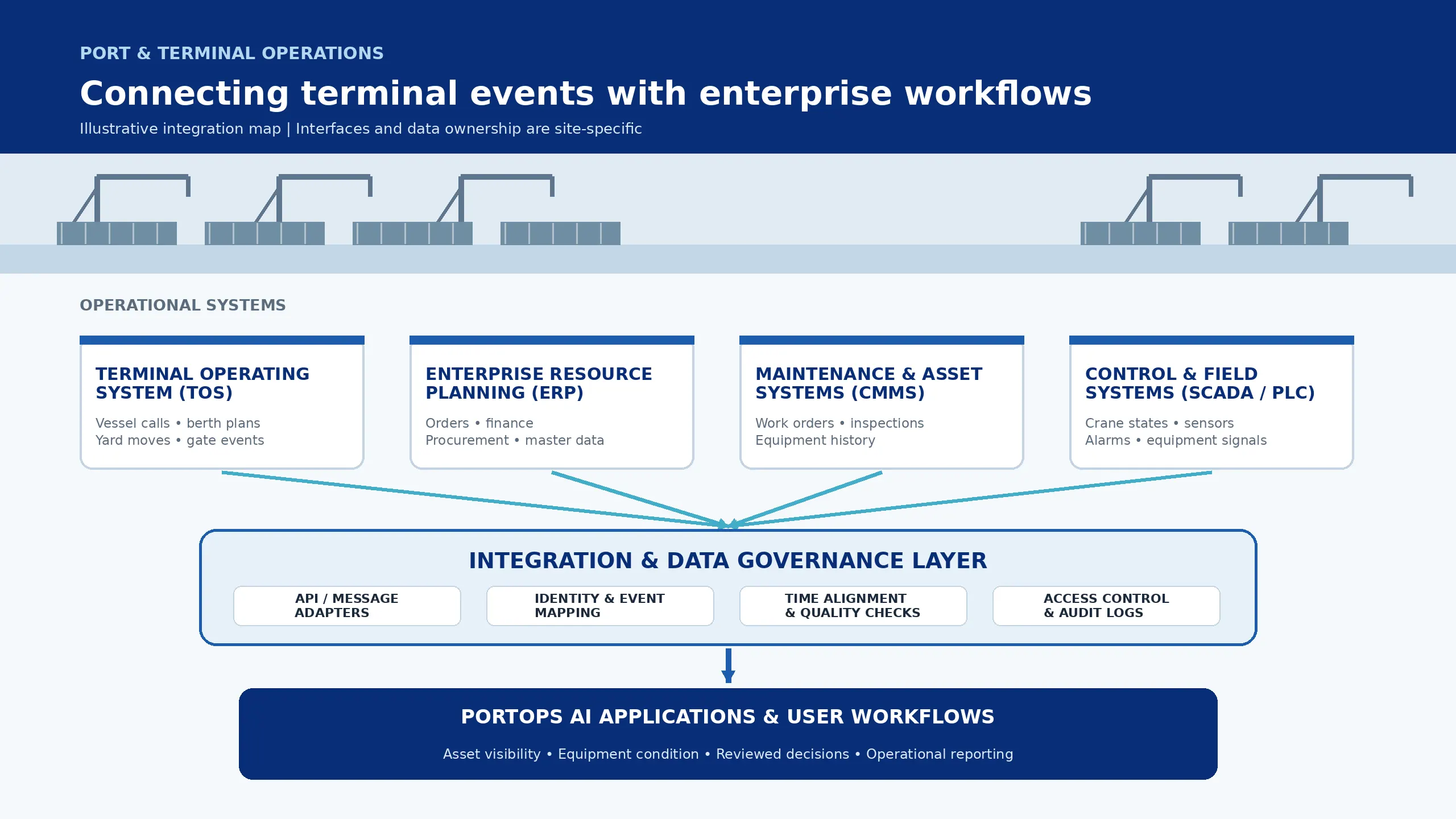
A terminal operating system (TOS) commonly coordinates vessel calls, berth plans, container inventory, yard positions, and move instructions. Depending on the facility, the integration boundary may also include:

  • Gate operating systems and access-control applications that record truck visits, appointments, driver or vehicle checks, and gate transactions.

  • Enterprise resource planning (ERP) systems that manage commercial orders, billing, procurement, finance, and reference data.

  • Warehouse management systems (WMS) or logistics applications that coordinate cargo staging, storage, and transfers where those functions are part of the terminal workflow.

  • Computerized maintenance management systems (CMMS) that hold equipment registers, inspections, maintenance requests, work orders, and repair history for quay cranes, yard cranes, reach stackers, terminal tractors, and other mobile equipment.

  • Supervisory control and data acquisition (SCADA) systems and programmable logic controllers (PLCs) that expose selected equipment states, alarms, and process measurements through approved interfaces.

  • Reefer monitoring, weighbridge, access, vessel-planning, port community, and environmental systems when they contribute data required by the selected workflow.

The integration map should show system owner, data owner, interface owner, update frequency, direction of exchange, and operational criticality. A data feed from a crane controller is not equivalent to a TOS move confirmation. Keep equipment state, business transaction, and independently verified physical outcome distinct.


Define data contracts before connecting systems

A data contract describes the structure and meaning of information exchanged between systems. It should be agreed by the application owners and technical teams before an interface is placed into service.

  • Identifiers: define the canonical asset, container, equipment, visit, work-order, and location identifiers used in each workflow. Document cross-system mappings and how retired or reused identifiers are handled.

  • Time: distinguish event time from ingestion time, specify the time zone and timestamp format, and define acceptable clock skew. Preserve source timestamps rather than silently replacing them.

  • Event meaning: document event names, required fields, units, status values, source system, and the business meaning of each state transition. For container transfers, specify what constitutes an observation, a handover, and a confirmed move.

  • Quality and rejection: define handling for missing fields, invalid units, duplicate messages, stale observations, conflicting locations, and records that fail validation. Rejected records need a reason and a route for review.

  • Synchronization: specify delivery expectations, ordering, retry behavior, idempotency, reconciliation, and how late-arriving events update a record without creating a false second movement.

  • Versioning: record interface versions, schema changes, compatibility windows, test environments, and the owner who approves a change.

For example, a yard-equipment condition event might include an asset identifier, event timestamp, ingestion timestamp, operating mode, measurement value, unit, quality flag, and source device. A maintenance workflow may then receive a reviewed alert or work-order request. The interface should not imply that the alert itself authorizes a machine command.

System integration map for port and terminal operations

Choose a deployment arrangement that fits the site

Deployment location affects latency, connectivity dependencies, data residency, maintenance effort, and responsibility for updates. Edge, customer-managed server, private hosting, and cloud are possible architectural patterns to assess. Their inclusion here does not mean that every arrangement is currently offered or suitable for every terminal.

Edge processing at the terminal

An edge gateway or local compute node can collect data close to field equipment, normalize selected messages, apply local quality checks, and buffer events during an upstream network interruption. This can be useful where terminal connectivity is intermittent or where a workflow has a defined local response-time requirement. Edge processing still needs managed power, physical protection, network segmentation, secure remote access, health monitoring, and a documented update process.

Customer-managed server

A server operated by the port authority, terminal operator, or its designated IT provider may keep selected services within an existing site environment. Confirm operating-system and database standards, virtualization policy, backup ownership, capacity, patch windows, administrator access, and disaster-recovery expectations before selecting this pattern.

Private hosting or cloud services

Private hosting or cloud deployment may simplify centralized maintenance and access across multiple facilities, but it depends on reliable connectivity, approved data flows, identity management, and the organization’s security and data-residency requirements. Define which data may leave the terminal, which services remain local, and what functions continue during a WAN or provider outage.

A hybrid design may place time-sensitive collection and buffering at the terminal while sending approved operational records to a central service. Select the arrangement from measured workflow needs and customer requirements, not from a general preference for one hosting model.

Plan for reliability, security, and recovery

Port operations run across large physical areas, multiple shifts, and equipment with different availability profiles. An integration design must state what happens when a device, network link, application, or upstream service is unavailable.

  • Buffer events locally where required, preserve original event times, and define storage limits and data-expiry rules.

  • Use retry and replay controls that prevent duplicate business transactions when a connection returns.

  • Monitor interface health, message age, queue depth, rejected-record counts, and last successful synchronization.

  • Separate read-only access from write access. Grant each service account only the permissions needed for its approved workflow.

  • Segment operational technology (OT) networks from enterprise information technology (IT) networks according to the site’s security architecture. Do not bridge control networks through an unreviewed general-purpose connection.

  • Protect credentials and keys, record administrative and interface activity, and define who reviews security logs and responds to incidents.

  • Assign responsibility for device firmware, gateway software, application updates, certificates, backups, vulnerability handling, and end-of-life replacement.

Where an integration supports a physical action, separate advisory information from command authority. A recommendation, workflow request, supervisory command, and low-level control signal are different operations. Existing equipment protections, interlocks, local control modes, and emergency procedures remain under the authority of the responsible site and equipment owners.

Validate interfaces and commission in stages

Integration acceptance should be based on documented tests and operational sign-off. A successful software demonstration does not establish that an interface is safe, reliable, or ready for use with live terminal equipment.

  • Confirm prerequisites: named system owners, approved network paths, test credentials, interface documentation, equipment access windows, and change-control approval.

  • Test representative records: normal events, duplicate messages, missing identifiers, invalid units, stale data, out-of-order events, and schema-version changes.

  • Test degraded conditions: network interruption, unavailable upstream application, full buffer, delayed acknowledgment, rejected write request, and recovery after service restoration.

  • Verify permissions: prove that read-only integrations cannot write, and that any approved write operation is restricted to the intended user, service, target, and operating state.

  • Reconcile outcomes: compare source and destination records, inspect event ordering, and confirm that the operational record matches the independently observed terminal or equipment state where applicable.

  • Run a controlled commissioning plan: begin in a non-production environment, progress to read-only or shadow operation where practical, then authorize a limited production scope only after acceptance criteria are met.

Acceptance criteria should define required event completeness, maximum acceptable data delay, duplicate and rejection handling, recovery behavior, access-control results, audit-log coverage, and the process for unresolved exceptions. Set thresholds with the customer and system owners; there are no universal values for every terminal.

Establish ownership for ongoing operation

An integration is a maintained operational dependency. Before handover, identify who monitors each interface, who investigates data-quality issues, who approves schema changes, who manages credentials, and who can authorize a rollback. Include terminal operations, IT, OT, equipment engineering, cybersecurity, and vendor contacts as appropriate.

The support model should include an interface register, version history, deployment records, monitoring thresholds, escalation contacts, backup and recovery procedures, maintenance windows, and a review schedule. Record any manual reconciliation step that remains necessary. Do not describe an interface as tested or supported unless the project has corresponding test records and an approved scope.

Discuss your terminal integration requirements

A practical assessment begins with one defined workflow, such as reconciling container gate events, associating crane condition data with maintenance records, or combining yard-equipment observations with a terminal operating record. PortOps AI can use that workflow to identify relevant systems, data contracts, deployment constraints, and validation questions.

Discuss a port operations integration project
Scroll to Top